Simplify your E*TRADE
stock plan records
An open-source desktop app that organizes your RSU and ESPP records — and gets you Schedule FA ready for Indian tax filing.
IT crackdown on foreign assets
The Hindu reports the IT Department is notifying taxpayers with non-disclosed foreign assets to file revised ITRs.
Read articleSchedule FA is mandatory
Nov 2025: the IT Department is actively identifying non-disclosure of foreign assets.
You must file it if you:
- • Hold RSUs/ESPPs from US companies
- • Have foreign bank accounts
- • Receive foreign income
Penalty for non-disclosure: up to 50% + prosecution
The challenge
Schedule FA requires detailed data for each asset — acquisition date, cost, fair market value, and exchange rates.
Compiling this by hand across multiple years is error-prone and time-consuming.
The solution
One-click CSV export
Every Schedule FA field auto-populated from your E*TRADE data.
How it works
Built for Schedule FA compliance
Everything you need for tax reporting, on your own machine
Schedule FA CSV Export
One-click export of all required Schedule FA fields—acquisition dates, costs, FMV, exchange rates
Import E*TRADE Documents
Easily import your E*TRADE statements and records
Track RSUs and ESPPs
Comprehensive tracking of all your stock holdings
Vesting & Transaction History
Organize vesting schedules and transaction records
Capital Gains & Tax Reports
Complete tax documents for Schedule FA, capital gains, and foreign income reporting
Sell Advisor
Lot-level advice on which shares to sell to optimize your tax outcome, with STCG/LTCG impact per lot
Privacy First - No Cloud
Your sensitive data stays on your computer. No uploads, no cloud storage.
Product tour
Explore the app
Click through the key features and interface
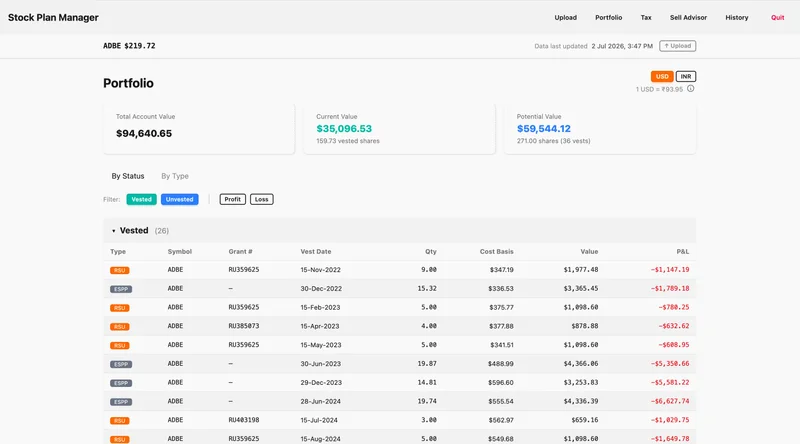
Portfolio View
Complete overview of your RSU and ESPP holdings with real-time values and gains/losses
Roadmap
Current status
What's available today and what's coming next
Available today
- E*TRADE support
- RSU & ESPP record management
- Desktop application
- Open source
Coming soon
- → Additional broker support
- → Dividend income support
- → Better Schedule FA assistance
- → More tax reports
Setup
Getting started in 3 steps
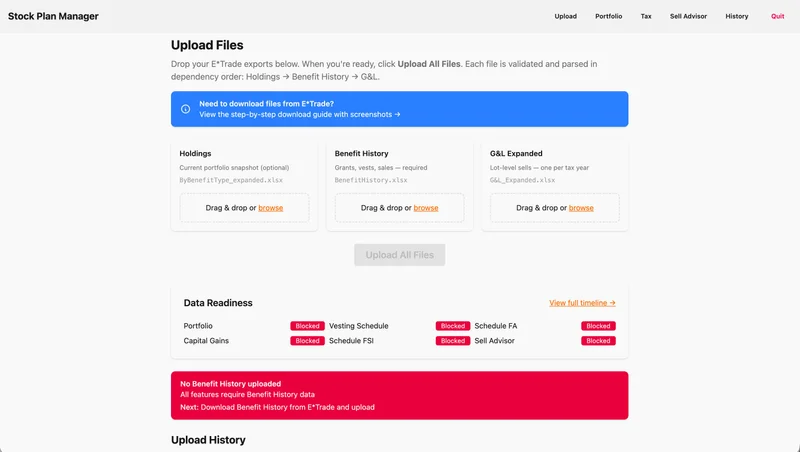
Download from E*TRADE and upload to Stock Plan Companion
Download Holdings
Log into E*TRADE Stock Plan → Holdings tab → Download → Download Expanded. Save the .xlsx file.
Current portfolio snapshot
Download Benefit History
Go to My Account → Benefit History. Click Download → Download Expanded. Save the .xlsx file.
Grants, vests, and sales history
Download Gains & Losses
My Account → Gains & Losses. Select tax year, click Apply, then Download → Download Expanded.
Capital gains tax data
Upload to Stock Plan Companion
Open the app and drag & drop your downloaded E*TRADE files. It validates and organizes everything automatically.
- Files are validated and parsed in order
- Data stays private on your computer
- Instant access to tax reports and analysis
Why this project?
Managing RSUs and ESPPs for Indian tax reporting is time-consuming and complex. This project simplifies record keeping and organization — we handle the paperwork so you can focus on what matters.
Note: This is not tax filing software and is not affiliated with E*TRADE or the Income Tax Department. Always consult a qualified tax professional for your specific situation.
Download
Get started today
Register to download the latest version
Open source
Stock Plan Companion is hosted on GitHub. Community contributions are welcome!